Your success in Google Associate-Cloud-Engineer is our sole target and we develop all our Associate-Cloud-Engineer braindumps in a way that facilitates the attainment of this target. Not only is our Associate-Cloud-Engineer study material the best you can find, it is also the most detailed and the most updated. Associate-Cloud-Engineer Practice Exams for Google Associate-Cloud-Engineer are written to the highest standards of technical accuracy.
Free Associate-Cloud-Engineer Demo Online For Google Certifitcation:
NEW QUESTION 1
You have one project called proj-sa where you manage all your service accounts. You want to be able to use a service account from this project to take snapshots of VMs running in another project called proj-vm. What should you do?
- A. Download the private key from the service account, and add it to each VMs custom metadata.
- B. Download the private key from the service account, and add the private key to each VM’s SSH keys.
- C. Grant the service account the IAM Role of Compute Storage Admin in the project called proj-vm.
- D. When creating the VMs, set the service account’s API scope for Compute Engine to read/write.
Answer: C
NEW QUESTION 2
You have production and test workloads that you want to deploy on Compute Engine. Production VMs need to be in a different subnet than the test VMs. All the VMs must be able to reach each other over internal IP without creating additional routes. You need to set up VPC and the 2 subnets. Which configuration meets these requirements?
- A. Create a single custom VPC with 2 subnet
- B. Create each subnet in a different region and with a different CIDR range.
- C. Create a single custom VPC with 2 subnet
- D. Create each subnet in the same region and with the same CIDR range.
- E. Create 2 custom VPCs, each with a single subne
- F. Create each subnet is a different region and with a different CIDR range.
- G. Create 2 custom VPCs, each with a single subne
- H. Create each subnet in the same region and with the same CIDR range.
Answer: A
NEW QUESTION 3
You deployed an App Engine application using gcloud app deploy, but it did not deploy to the intended project. You want to find out why this happened and where the application deployed. What should you do?
- A. Check the app.yaml file for your application and check project settings.
- B. Check the web-application.xml file for your application and check project settings.
- C. Go to Deployment Manager and review settings for deployment of applications.
- D. Go to Cloud Shell and run gcloud config list to review the Google Cloud configuration used for deployment.
Answer: A
NEW QUESTION 4
You need to provide a cost estimate for a Kubernetes cluster using the GCP pricing calculator for Kubernetes. Your workload requires high IOPs, and you will also be using disk snapshots. You start by entering the number of nodes, average hours, and average days. What should you do next?
- A. Fill in local SS
- B. Fill in persistent disk storage and snapshot storage.
- C. Fill in local SS
- D. Add estimated cost for cluster management.
- E. Select Add GPU
- F. Fill in persistent disk storage and snapshot storage.
- G. Select Add GPU
- H. Add estimated cost for cluster management.
Answer: C
NEW QUESTION 5
You’ve deployed a microservice called myapp1 to a Google Kubernetes Engine cluster using the YAML file specified below: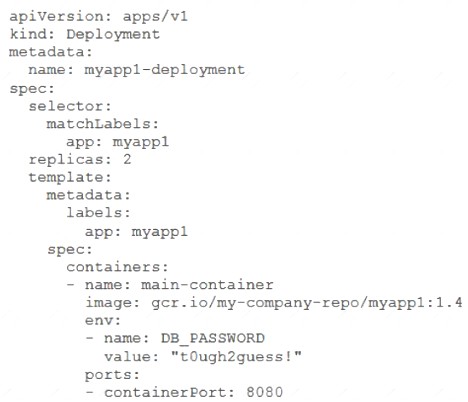
You need to refactor this configuration so that the database password is not stored in plain text. You want to follow Google-recommended practices. What should you do?
- A. Store the database password inside the Docker image of the container, not in the YAML file.
- B. Store the database password inside a Secret objec
- C. Modify the YAML file to populate the DB_PASSWORD environment variable from the Secret.
- D. Store the database password inside a ConfigMap objec
- E. Modify the YAML file to populate the DB_PASSWORD environment variable from the ConfigMap.
- F. Store the database password in a file inside a Kubernetes persistent volume, and use a persistent volume claim to mount the volume to the container.
Answer: C
NEW QUESTION 6
You are creating an application that will run on Google Kubernetes Engine. You have identified MongoDB as the most suitable database system for your application and want to deploy a managed MongoDB environment that provides a support SLA. What should you do?
- A. Create a Cloud Bigtable cluster and use the HBase API
- B. Deploy MongoDB Alias from the Google Cloud Marketplace
- C. Download a MongoDB installation package and run it on Compute Engine instances
- D. Download a MongoDB installation package, and run it on a Managed Instance Group
Answer: D
NEW QUESTION 7
You need to configure optimal data storage for files stored in Cloud Storage for minimal cost. The files are used in a mission-critical analytics pipeline that is used continually. The users are in Boston, MA (United States). What should you do?
- A. Configure regional storage for the region closest to the users Configure a Nearline storage class
- B. Configure regional storage for the region closest to the users Configure a Standard storage class
- C. Configure dual-regional storage for the dual region closest to the users Configure a Nearline storage class
- D. Configure dual-regional storage for the dual region closest to the users Configure a Standard storage class
Answer: B
NEW QUESTION 8
You need to select and configure compute resources for a set of batch processing jobs. These jobs take around 2 hours to complete and are run nightly. You want to minimize service costs. What should you do?
- A. Select Google Kubernetes Engin
- B. Use a single-node cluster with a small instance type.
- C. Select Google Kubernetes Engin
- D. Use a three-node cluster with micro instance types.
- E. Select Compute Engin
- F. Use preemptible VM instances of the appropriate standard machine type.
- G. Select Compute Engin
- H. Use VM instance types that support micro bursting.
Answer: C
NEW QUESTION 9
You have a development project with appropriate IAM roles defined. You are creating a production project and want to have the same IAM roles on the new project, using the fewest possible steps. What should you do?
- A. Use gcloud iam roles copy and specify the production project as the destination project.
- B. Use gcloud iam roles copy and specify your organization as the destination organization.
- C. In the Google Cloud Platform Console, use the ‘create role from role’ functionality.
- D. In the Google Cloud Platform Console, use the ‘create role’ functionality and select all applicable permissions.
Answer: B
NEW QUESTION 10
You have a website hosted on App Engine standard environment. You want 1% of your users to see a new test version of the website. You want to minimize complexity. What should you do?
- A. Deploy the new version in the same application and use the --migrate option.
- B. Deploy the new version in the same application and use the --splits option to give a weight of 99 to the current version and a weight of 1 to the new version.
- C. Create a new App Engine application in the same projec
- D. Deploy the new version in that application.Use the App Engine library to proxy 1% of the requests to the new version.
- E. Create a new App Engine application in the same projec
- F. Deploy the new version in that application.Configure your network load balancer to send 1% of the traffic to that new application.
Answer: B
NEW QUESTION 11
You are configuring service accounts for an application that spans multiple projects. Virtual machines (VMs) running in the web-applications project need access to BigQuery datasets in crm-databases-proj. You want to follow Google-recommended practices to give access to the service account in the web-applications project. What should you do?
- A. Give “project owner” for web-applications appropriate roles to crm-databases- proj
- B. Give “project owner” role to crm-databases-proj and the web-applications project.
- C. Give “project owner” role to crm-databases-proj and bigquery.dataViewer role to web-applications.
- D. Give bigquery.dataViewer role to crm-databases-proj and appropriate roles to web-applications.
Answer: D
NEW QUESTION 12
You are hosting an application from Compute Engine virtual machines (VMs) in us–central1–a. You want to adjust your design to support the failure of a single Compute Engine zone, eliminate downtime, and minimize cost. What should you do?
- A. – Create Compute Engine resources in us–central1–b.–Balance the load across both us–central1–a and us–central1–b.
- B. – Create a Managed Instance Group and specify us–central1–a as the zone.–Configure the Health Check with a short Health Interval.
- C. – Create an HTTP(S) Load Balancer.–Create one or more global forwarding rules to direct traffic to your VMs.
- D. – Perform regular backups of your application.–Create a Cloud Monitoring Alert and be notified if your application becomes unavailable.–Restore from backups when notified.
Answer: C
NEW QUESTION 13
You recently deployed a new version of an application to App Engine and then discovered a bug in the release. You need to immediately revert to the prior version of the application. What should you do?
- A. Run gcloud app restore.
- B. On the App Engine page of the GCP Console, select the application that needs to be reverted and click Revert.
- C. On the App Engine Versions page of the GCP Console, route 100% of the traffic to the previous version.
- D. Deploy the original version as a separate applicatio
- E. Then go to App Engine settings and split traffic between applications so that the original version serves 100% of the requests.
Answer: D
NEW QUESTION 14
You have an instance group that you want to load balance. You want the load balancer to terminate the client SSL session. The instance group is used to serve a public web application over HTTPS. You want to follow Google-recommended practices. What should you do?
- A. Configure an HTTP(S) load balancer.
- B. Configure an internal TCP load balancer.
- C. Configure an external SSL proxy load balancer.
- D. Configure an external TCP proxy load balancer.
Answer: A
NEW QUESTION 15
You need to manage a third-party application that will run on a Compute Engine instance. Other Compute Engine instances are already running with default configuration. Application installation files are hosted on Cloud Storage. You need to access these files from the new instance without allowing other virtual machines (VMs) to access these files. What should you do?
- A. Create the instance with the default Compute Engine service account Grant the service account permissions on Cloud Storage.
- B. Create the instance with the default Compute Engine service account Add metadata to the objects on Cloud Storage that matches the metadata on the new instance.
- C. Create a new service account and assign this service account to the new instance Grant the service account permissions on Cloud Storage.
- D. Create a new service account and assign this service account to the new instance Add metadata to the objects on Cloud Storage that matches the metadata on the new instance.
Answer: C
NEW QUESTION 16
......
100% Valid and Newest Version Associate-Cloud-Engineer Questions & Answers shared by Thedumpscentre.com, Get Full Dumps HERE: https://www.thedumpscentre.com/Associate-Cloud-Engineer-dumps/ (New 190 Q&As)